Help us shape device audio capture on the web

Imagine you're building a web app that provides one of these experiences:
- Custom echo cancellation or voice processing.
- Note taking from a meeting or lecture playing in another tab or application.
- Livestream production or music creation tools, which process audio from different sources.
To build these, your app needs access to the audio that's playing on the user's device. This could be the audio that's coming from a browser tab, another application, or somewhere else on the device. Let's call this device audio.
On the Edge team, we're proposing a new API for capturing device audio without also capturing pixels on the screen, and we'd love your feedback on the design and whether you'd use it.
The problem with getDisplayMedia()
Today, if you want to implement the above use cases, your only option to capture device audio is to use navigator.mediaDevices.getDisplayMedia().
However, calling this method asks the user to share a tab, a window, or their entire screen. Here is what the experience might look like for the user:
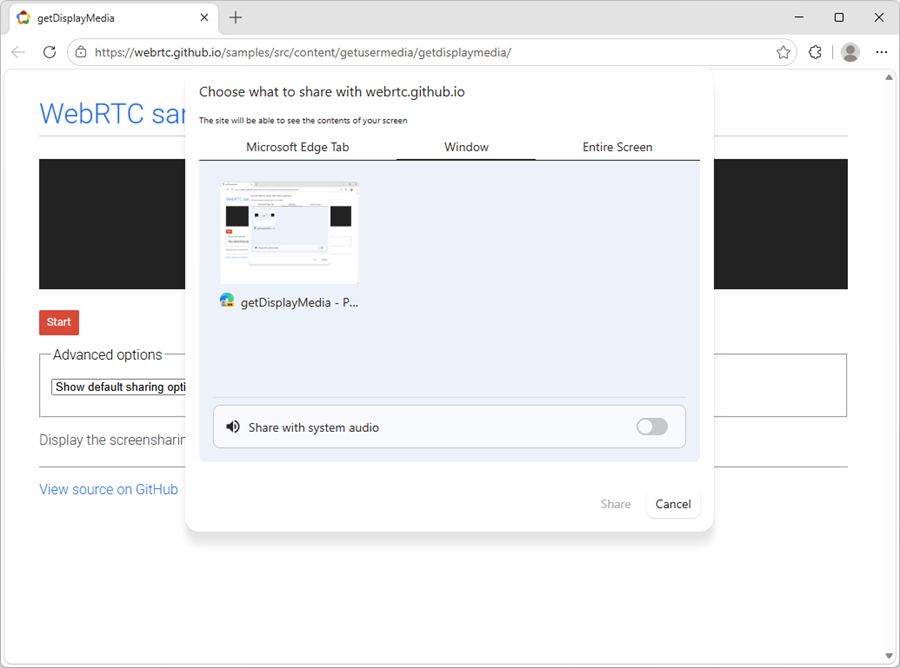
The entire experience is centered around sharing the screen, even if your app only needs the audio. Of course, you can always not use the video track, and even stop it, but the user must still go through the above screen-sharing configuration flow. Audio is also optional and might not even be returned.
Our proposal: device audio capture
We're proposing an audio-only capture API for the web, which would let your app ask users to choose a supported audio source and share only what your app needs.
With this new API:
- Users would see an audio sharing experience that makes sense to them.
- Your app would only receive an audio track, which you can then work with by using the Web Audio API, MediaRecorder, WebRTC, and any other existing APIs.
- The browser would continue to control the user permission and source selection flows, as well as indicate to the user when audio is being captured, letting them stop it at any time.
Two possible API directions
We want to make device audio capture a first-class capability of the web, and to achieve this, we're currently contemplating two different APIs, described below.
Option 1: Extend getDisplayMedia() to allow audio-only capture
This option would allow you to request audio-only capture using the existing getDisplayMedia() method, without having to deal with video tracks. Specifically, you'd be able to set the video option to false and the audio option to true, which is something that's not possible today:
const stream = await navigator.mediaDevices.getDisplayMedia({
  video: false,
  audio: true,
});
This option lets us extend an existing API, and reuse the existing browser experience when the user is choosing what to share.
Option 2: Introduce a new getPlaybackMedia() API
In this option, we introduce a new dedicated API: the getPlaybackMedia() method:
const stream = await navigator.mediaDevices.getPlaybackMedia({
  audio: true
});
This new method clearly describes that it is intended for playback capture and it only returns an audio playback stream.
Learn more about the two approaches
If you want more details, including on the API directions and tradeoffs, checkout our full proposal.
User experience
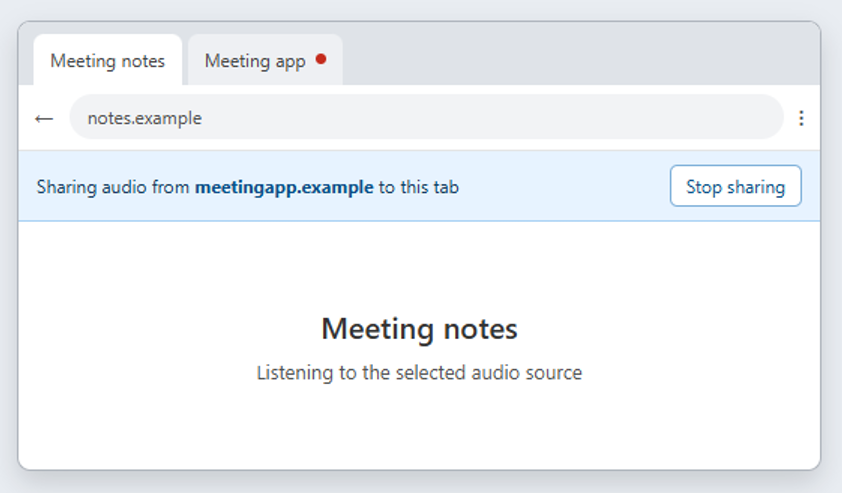
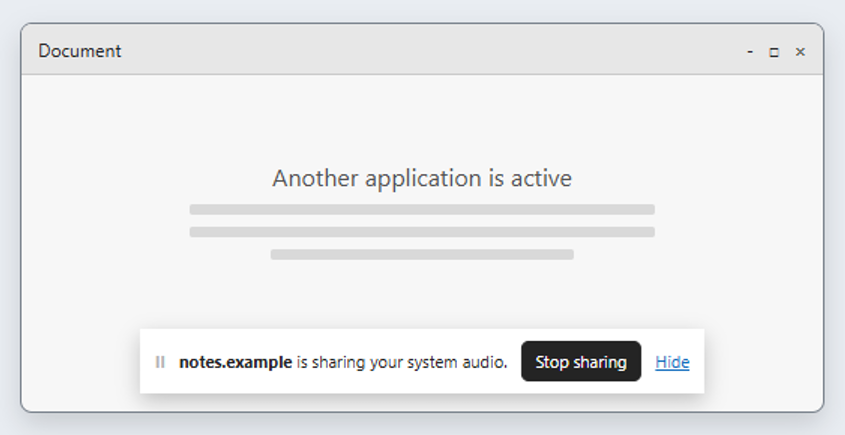
A key part of the feature is its user experience. It should always be very clear to the user that they are sharing audio, where they're sharing it from, and where they're sharing it to.
In addition to the feature proposal, we're also working on mockups showing what the experience would look like to users.
For example, when sharing with a notetaking app, we think the user should always see that they're sharing audio with the app:
Or, when sharing system audio from another app, it should always be visible to the user that sharing is happening:
Let us know your thoughts!
If your need to capture device audio, we'd love to hear from you. As with any addition to the web, getting feedback from actual developers is invaluable because it helps us understand the real-world use cases and challenges.
So, if that sounds like an API you'd use, please tell us:
- What you are building.
- What audio sources you need access to, such as audio from a browser tab, an application, all audio playing on the device, or some combination.
- Which API option would work best for you.
- Or any other feedback you might have.
The best way to get in touch is by opening a new issue on our explainers repo at GitHub.
You can also reach out to Nishitha Dey on LinkedIn. She's my colleague and she works on this proposal directly. She also helped me write this post.
Finally, you can also get in touch with me on LinkedIn, Mastodon, or Bluesky.
Let us know what you think! With your help, we can make this happen!