WebMCP updates, clarifications, and next steps
Six months have pased since I wrote about WebMCP. Both an eternity in the world of AI, and a blink of an eye in the world of web standards.
In my earlier post, I introduced the general idea: letting you, web developers, register tools on your pages so AI agents can use them. The proposal is still evolving, and I wanted to provide a quick update, as well as some corrections to my original post.
If you've heard about WebMCP recently, that's likely because Google Chrome announced their early preview. Keep in mind, however, that WebMCP isn't from a single vendor. It's Microsoft and Google working closely together through the Web Machine Learning Working Group at W3C. That's many people collaborating to shape how AI agents will soon interact with the web.
WebMCP and MCP: clearing up the confusion
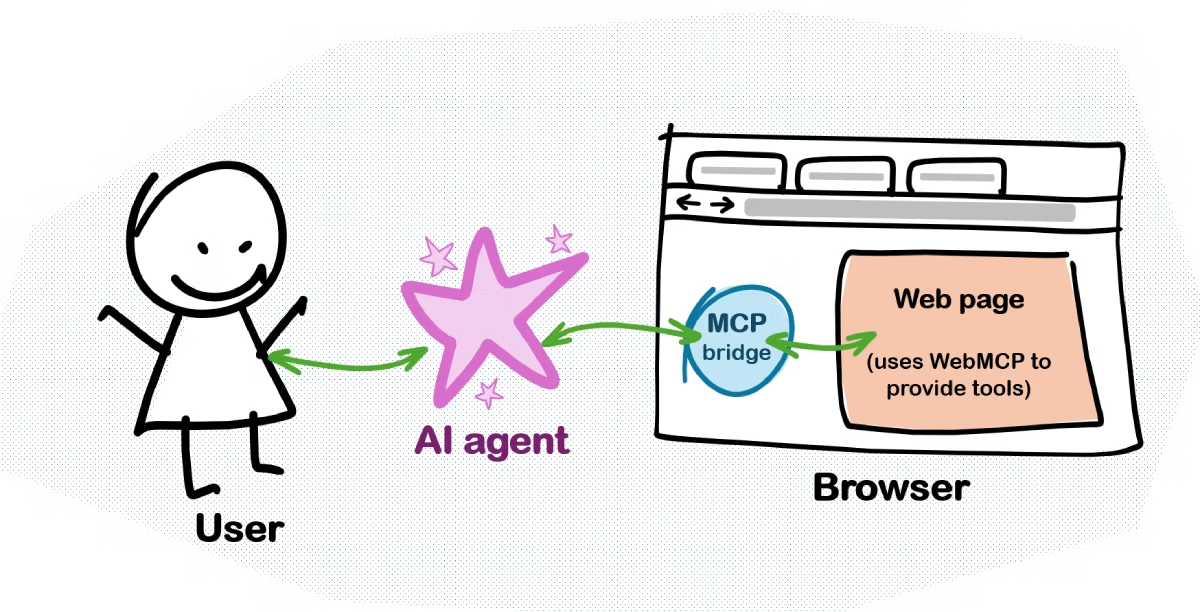
In my first post, I said that the browser acted as an MCP server. That's not exactly right. I was simplifying how WebMCP relates to the Model Context Protocol.
The spirit of it is correct. The browser does become an agent-accessible interface to the page. But the reality is more nuanced:
MCP is three layers stacked together:
- Primitives: the tools, resources, prompts, etc.
- Data layer: how the MCP client and server talk.
- Transport layer: how messages move around.
WebMCP only really cares about that first layer. A WebMCP tool looks almost exactly like an MCP tool. Same name, same description, same input schema, same implementation function.
But the browser handles the other two layers for you. The spec even says this outright:
Implementation of the data layer to arbitrate access to these primitives for an Agent is left to the browser.
Why does this matter? A few reasons:
- The browser can stay compatible as MCP evolves. You don't break when the protocol changes.
- The browser can enforce web-specific security policies, for keeping users safe.
- You don't implement MCP yourself. You just write JavaScript functions. That's it.
- The API feels natural for web development.
So what is WebMCP really? It's an API for exposing tools from a webpage. The browser then translates those tools into MCP format when talking to agents. Under the hood, the browser is doing the protocol work for you.
The spec uses the term Model context provider. Through navigator.modelContext.provideContext() (and other APIs), your webpage provides context. It provides the tools that an AI agent then uses, but it's the browser that talks to the agent.
What's new since August 2025?
As a result of the collaboration, the spec keeps getting better. It's still in draft form as of early 2026, but the core API design is taking shape. Here are the highlights of what's new since August 2025:
-
API naming: The API now lives at
window.navigator.modelContext. Earlier versions called itwindow.agent. -
User interaction built-in: The spec now has
agent.requestUserInteraction()to let tools ask the browser to get user confirmation before doing something. This is to keep the human in the loop, and prevent an AI agent from completing a purchase without asking you first. -
Smarter tool management: You still have
navigator.modelContext.provideContext()to set all tools at once, but now there's alsoregisterTool()andunregisterTool(). This is great for single-page apps where you want to enable or disable specific tools based on what's happening in your app. -
MCP relationship spelled out: The spec now has a whole section on "Intersection with MCP".
What's next?
AI agents are already using the web, that much is true. On the Edge team, we care about keeping not only the human in the loop, but developers too. That's why we care about WebMCP and will continue to collaborate with the community to improve it.
The best way to make it great is by testing it with real scenarios and then providing informed feedback. Google's early preview is a great step towards this, and stay tuned for more news from the Edge team as well!
In the meantime, if you have ideas, feedback, concerns, or just want to get involved, please take a look at the proposal and reach out, for example by opening a new issue or jumping into existing discussions.