Fun with the web

Fun makes learning better!
Kids learn by having fun, and adults do too, we just forgot about it. When you're having fun, your brain is more engaged, more open to learning new things. And yet, as adult professionals, we forget that sometimes. It's all serious business, and that's just sad.
Fun is how I learned to code for the web in the first place. I didn't know any programming as a kid (apart from a bit of Logo programming with a Turtle), I just liked computers. And when the web came along, as a teenager, I was blown away by the access to infinite information and communities, and wanted to be part of it. That's why I started creating simple web pages using HTML, and then (much) later added CSS and JavaScript to the mix.
If your story is a little bit like mine, do you remember the first time you built something for the web? That thrill of seeing your code come alive and displaying pixels on the screen?
Somewhere along the way, many of us lost that joy. Deadlines, frameworks, best practices. These things tend to turn play into process. But here's the thing: fun isn't a luxury. It's how we learn best. It's how we grow. To me, the web is still the most playful platform out there. You can just open a text editor, write some code, and then play with that code live in the browser. No complex setup, no heavy tools, just you, your creativity, and appetite for learning something new that might, one day, prove useful.
I still love doing things just for fun, things that aren't production ready, far from it, but that let me explore new things.
For example, here's some flying math equations:
Math isn't exactly seen as fun, but being able to render mathematical notations on web pages felt like a cool thing to learn about.
Turns out MathML, the markup language for mathematical notations, is available across all browsers. Building the above demo taught me how to use the language, which is really quite simple. Here's an identity formula:
But you can display more complex things too:
It took me a while to figure out the flying animation, but using the perspective CSS property and then animating the translate property along the Z axis made it easy in the end.
After spending way too much time making math fly across the screen, I realized something: there's a constant trickle of new features being add to the web all the time. So there's always something I've never played with. What else have I been ignoring? What other elements, properties, or APIs are hiding, waiting to be abused for something they weren't really invented for?
The HTML <dialog> element caught my eye. It's been around for some time now, and I've used it in simple demos, but never explored the various ways to open and close it, or how to style it. So, of course, I had to try and make a game with it: Whack a dialog!
Click start below, and then try to close as many of the popping dialogs as you can before they disappear again.
What's the point you ask? Learning through play, in order to gain self-confidence in using the <dialog> element!
Now, I can say that I understand the ways in which dialogs can be opened and closed. Even better, I can do it without JavaScript code, by using the the command and commandfor attributes from the Invoker commands API. I also know that it's possible to fully customize the default styling if dialogs, and I even learned a few tricks to animate them.
Look, I know that many companies, especially those operating under tight budgets and client deadlines, can't really dedicate time to do silly things like this, or even prioritize a more serious form of learning. Investing in experimentation or skill-building often seems like a luxury they simply can't afford. This is sad because it doesn't help break the cycle of repeating the same patterns, using the same frameworks, and eventually shipping the same broken code.
This isn't inevitable though. There are ways to carve out space for growth, even in constrained environments:
- Micro-learning during projects by trying something new on a real task.
- Super quick internal meetings for sharing discoveries.
- Leveraging online resources like MDN, web.dev, and plenty other free content.
- Trying to convince your clients of the value of modern approaches to a problem, for example for performance benefits, accessibility improvements, etc.
Learning doesn't always require a big budget, especially if it's based on letting people have fun and experiment on their own.
Now let's play some Grid Pong!
Click anywhere inside the game area below to start or to pause it. Or, with the keyboard, focus the game and then press Enter. To play, use W and S to move the left paddle up and down, and O and L to move the right paddle up and down.
I've been a huge fan of CSS grid for a long time, ever since it got implemented in browsers, back in 2015 (see my future of layout with CSS Grid Layouts article from back then).
Grid is made for layouts, but how fun is that? What if we could use it as a canvas instead? After all, grid lets you define any number of rows and columns in an area and then place items anywhere within them, by using a very handy coordinate system via grid-row and grid-column.
I'm sure some day someone will display a runnable version of DOOM in a CSS grid, but for now, I limited myself to a playable version of the retro game Pong, which renders in a CSS grid.
The ball and paddles are HTML elements that get re-positioned within the grid by using the grid-row and grid-column properties as you play the game. This is different to how most web games usually work, which is by running a draw loop which clears and then draws onto a <canvas> at every frame. Here, the elements remain in the DOM all the time, and only their position in the grid changes.
Open DevTools (F12) to see for yourself. Right-click the game and select Inspect to inspect the game DOM structure. If you enable the grid overlay, you should see something like this:
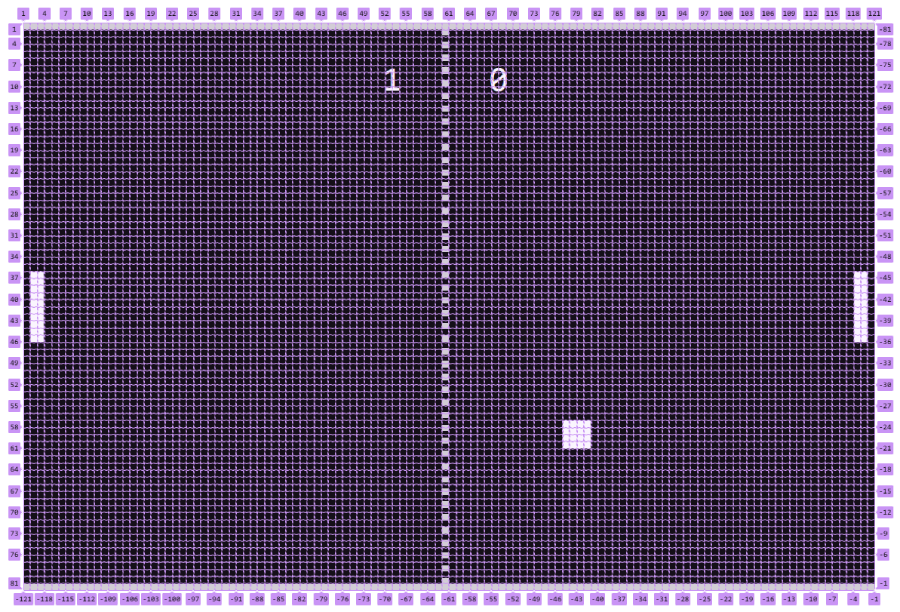
One cool thing I learned while making this demo is the shorthand syntax for grid-area allows you to position elements respective to grid line numers. I've only been using the property for named areas until now. But now, I know that grid-row-start: 1; grid-row-end: 3; grid-column-start: 2; grid-column-end: 4; can be shortened to grid-area: 1 / 2 / 3 / 4;.
Having fun pays off.
Play has a funny way of turning complex concepts into instincts. CSS math is one of those complex concepts: cos(), sin(), tan(), transforms, paths… using these can get abstract very quickly. But when you're building for fun, trying to create something nice without constraints, these abstractions become tools, like paint brushes.
Instead of trying to understand the theory first, and then create something very specific, you chase a visual daydream, something that isn't clearly defined, and you learn as you go. While creative coding for fun, you inevitably bump into aspects of the web platform that you tweak and experiment with until you get the effect you want, and that's what makes it stick.
Here is a kaleidoscope built with CSS. No canvas, just clip-path, tan(), scale, transform, and some CSS calculations. A little toy which taught me a lot about geometry in CSS.
At the end of the day though, I still suck at doing any kind of complex maths in CSS. If you want to get your mind blown, check out Ana Tudor, Temani Afif, or Amit Sheen on CodePen. These folks are on another level.
What I love about these experiments is how often they reveal hidden layers deep within what would otherwise appear as ordinary parts of the web.
CSS box-shadow is an example of one of these parts which, at first sight, may seem familiar, almost boring. But it also comes with hidden complexity and extra capabilities that, at least for me, only playing for no other reason than fun could reveal. Among them: the box-shadow syntax, the ability to layer multiple shadows, the way they spread from each other, and the ability to animate shadows.
So, here is a demo that's all about taking the smallest possible unit: a single CSS property, and seeing how weird I could make it:
There are twenty circles in the above visual. Each is a <div> element with rounded corners and is randomly positioned. Each has three different shadows applied, and the shadows are animated. For extra fun, I used mix-blend-mode to get some interesting interactions where the circles overlap, and you can also click the area to colorize it.
Playing with this taught me a few things:
-
I finally remember the syntax for
box-shadow. It is:box-shawdow: <x offset> <y offset> <blur radius> <spread radius> <color>;I love that you can reset the blur radius to draw a shape around any element. For example
box-shadow: 0 0 0 10px reddraws a 10px red "border" around an element. -
I also now understand how multiple shadows stack. Subsequent shadows are drawn below previous ones. And the spread value is relative to the size of the previous shadow too.
-
mix-blend-modeis really fun when drawing abstract stuff like this.
These experiments aren't just toys. They're reminders that the web platform is alive and kicking, full of features and capabilities that are just waiting to be discovered. They're also a reminder that we can all be creative people, given the right mindset and the right tools, and that learning through play is a powerful way to grow as a developer.
Take an hour to play. Try something weird. Learn something new. If you do make something fun, share it with others, on your personal website, on social media, on codepen, or with your colleagues.
Alright, one last silly experiment before I wrap this up. Meet a new special kind of popup hell!
Try moving the red popup above. And click below to make it even worse:
Anchor positioning is very new and not quite ready for prime time yet. To me, this means it's the perfect time to learn more about it. I've seen countless messages on social media, talks, and demos about anchor positioning already, but I have never tried it myself.
In this demo, there's one hundred popups (remember the good old days of popup hell on the web?), and they're all chained together using anchor positioning. They're randomly tethered to other popups, and randomly placed respective to their anchors. When you move the red popup around, all other popups randomly follow it because they're indirectly anchored to it via other popups, possibly through multiple levels of anchoring.
This is obviously not something you'd ever need to do in a real project. But in trying to achieve the exact look I was after, I learned a lot about anchor positioning. It made me realize that you can tether multiple elements to the same anchor, it made me use properties like anchor-name, position-anchor, the anchor() function, and it also made me aware of other capabilities, such as the position-try property, but also the anchor HTML attribute.
Don't forget to play
The web is an amazingly playful app platform. That's what it was to me some 25 odd years ago, and that's what it still is. A platform where a text editor and a browser of your choice is all you need to start creating. No gatekeepers, no approval processes.
Every silly experiment, demo, and useless project I've shown here and others I've worked on over the years have taught me something new about the web, and have kept my passion for it alive.
The web is still magic, and it still matters. Even today when it feels like AI is replacing how people consume and create content.
Go create something ridiculous, learn by playing, keep the web weird and wonderful.